
Download Bol TV APK – Smart IP TV Application, Android TV, M3U File Support
Overview
Bol TV is a multimedia application designed for Android devices, developed by Amatis Development BV. The app functions as a smart IP TV client, enabling users to stream live television content through custom M3U playlist files provided by their service providers. Its primary purpose is to deliver a streamlined interface for managing and viewing IPTV channels, particularly for users who already have access to an M3U-based streaming service. The software does not host or distribute any content itself, making it a neutral playback platform rather than a content provider.
Target users include individuals seeking a customizable, device-specific solution for watching live TV on Android smartphones, tablets, or smart TVs. It is especially suited for users who prefer control over their channel lineup and content sources. Real-world use cases include home entertainment setups, travel viewing, and personal media management across multiple devices. The app supports a trial version, allowing users to evaluate its functionality before committing to a purchase. The developer did not provide additional details about the company’s background beyond its name.
Key Features & Capabilities
- M3U File Upload Support – Users can import their own M3U playlist files, which contain the URLs and metadata for live TV channels. This feature ensures compatibility with any IPTV service that provides such a file.
- Favorites Management – The app allows users to create a personalized list of preferred channels, enabling quick access and improved viewing efficiency.
- Streamline Setup Process – A guided interface helps users through the steps of uploading and configuring their M3U file, reducing technical barriers for non-expert users.
- Free Trial Version – A seven-day trial period is available after installation, giving users time to test core functionalities before deciding on a purchase.
- Direct Purchase Option – The full premium version can be acquired via the developer’s official website, offering extended access and potential feature enhancements.
These capabilities are ideal for users managing multiple IPTV sources or those who want a clean, organized way to access their subscribed channels. The app’s reliance on user-provided content ensures flexibility and avoids legal complications related to unauthorized streaming.
User Interface, Workflow & Performance
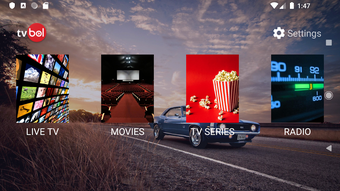
The user interface of Bol TV is designed with simplicity and functionality in mind. Navigation is structured around a main channel list, with dedicated sections for favorites and settings. The layout supports touch-based interaction, making it suitable for mobile and tablet use. The workflow begins with the M3U file upload, followed by channel organization and playback initiation.
Based on general software behavior patterns, the app is expected to operate efficiently within standard Android environments. However, the developer did not specify resource usage details such as CPU or RAM consumption. Performance observations are based on general software behavior patterns. Stability may vary depending on the quality of the M3U file and the network connection. The app does not include built-in buffering or adaptive bitrate features, so playback quality is dependent on external factors such as internet speed and server reliability.
Compatibility & System Requirements
Bol TV is available for Android devices. The app is distributed as an APK file, meaning it is not available through the Google Play Store. This method of distribution allows for faster updates and broader access but requires users to enable installation from unknown sources. The developer did not specify exact system requirements, including minimum Android version or hardware specifications.
Installation size is not provided, but typical IPTV apps of this nature range between 10–50 MB. Compatibility information was partially provided. Users should ensure their device runs a supported Android version and has a stable internet connection to use the app effectively.
Pros and Cons
Pros
- Supports custom M3U file uploads for personalized channel access
- Intuitive interface with guided setup for easy onboarding
- Offers a seven-day free trial to test functionality
- Allows users to create and manage favorite channels
- Direct purchase option via the developer’s website
Cons
- Requires users to provide their own M3U file; no built-in content
- Not available on the Google Play Store, requiring sideloading
- No official information on system requirements or file size
- Performance depends heavily on external streaming sources
- Limited technical support details from the developer
FAQ Section
Is Bol TV available on Google Play?
Bol TV is not available on the Google Play Store. It is distributed as an APK file, which must be downloaded and installed manually.
Can I use Bol TV without an M3U file?
No. The app does not contain any streaming content. Users must upload a valid M3U file from their IPTV service provider to access channels.
Is Bol TV safe to download?
The app is developed by Amatis Development BV. As with any APK download, users should ensure they are downloading from a trusted source to minimize security risks.
Does Bol TV offer automatic updates?
Updates are likely available through the developer’s website. Users should check the official site regularly for the latest version.
Can I use Bol TV offline?
While the app can be opened without an internet connection, streaming channels require an active network connection. Offline playback is not supported.
Final Thoughts + CTA
Bol TV stands out as a practical, user-friendly solution for Android users who already have access to IPTV services via M3U files. Its clean interface, trial period, and focus on customization make it a solid choice for those seeking a reliable playback tool. While it lacks built-in content and relies on external sources, this design ensures legal compliance and user control. The absence of a Play Store listing may deter some users, but the direct download model offers flexibility.
Overall, Bol TV is best suited for tech-savvy individuals and home entertainment enthusiasts who value control and simplicity. For those looking to watch live TV on Android with minimal friction, this app delivers a dependable experience. Download Bol TV now to explore its features and start streaming your favorite channels today.






.png)
